Collections
Group related documents, URLs, conversations, and research reports into themed workspaces — then chat with your collection using all its content as context.
What is a Collection?
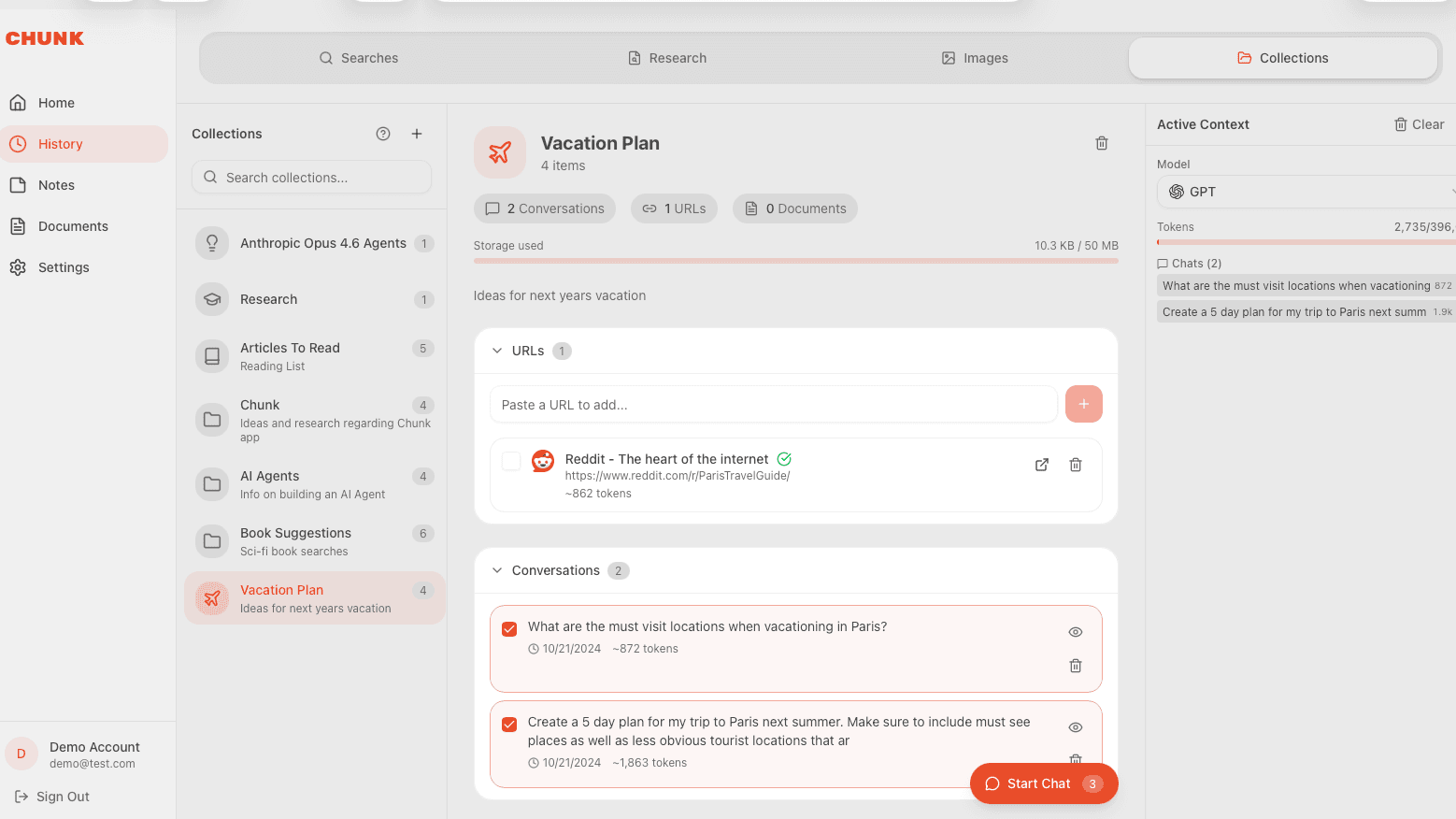
A Collection is a themed group of content. Think of it as a project folder that you can have a conversation with. Add your sources, configure which ones the AI should reference, and start chatting with full context.
Creating a Collection
Head to the Collections tab in Workstation and click "Create Collection". Give it a name and optional description. You can also create collections directly from a conversation or research report using the add-to-collection action.
Adding content
Collections support multiple content types that you can mix and match.
- Documents — upload files directly to the collection with automatic text extraction.
- URLs — paste any web URL and Chunk automatically extracts its content.
- Conversations — add past chat conversations for reference.
- Research Reports — include research you've generated.
Context settings
Not every item in a collection needs to be part of the AI context. Use the context toggle on each item to selectively choose which ones the AI should reference when you chat. Chunk shows a token estimate so you can see how much context is being used.
Collection-scoped chat
Once your collection has content, open it and start chatting. The AI will use the enabled items as context for its responses — perfect for focused research, client projects, or study topics.